
TailMux
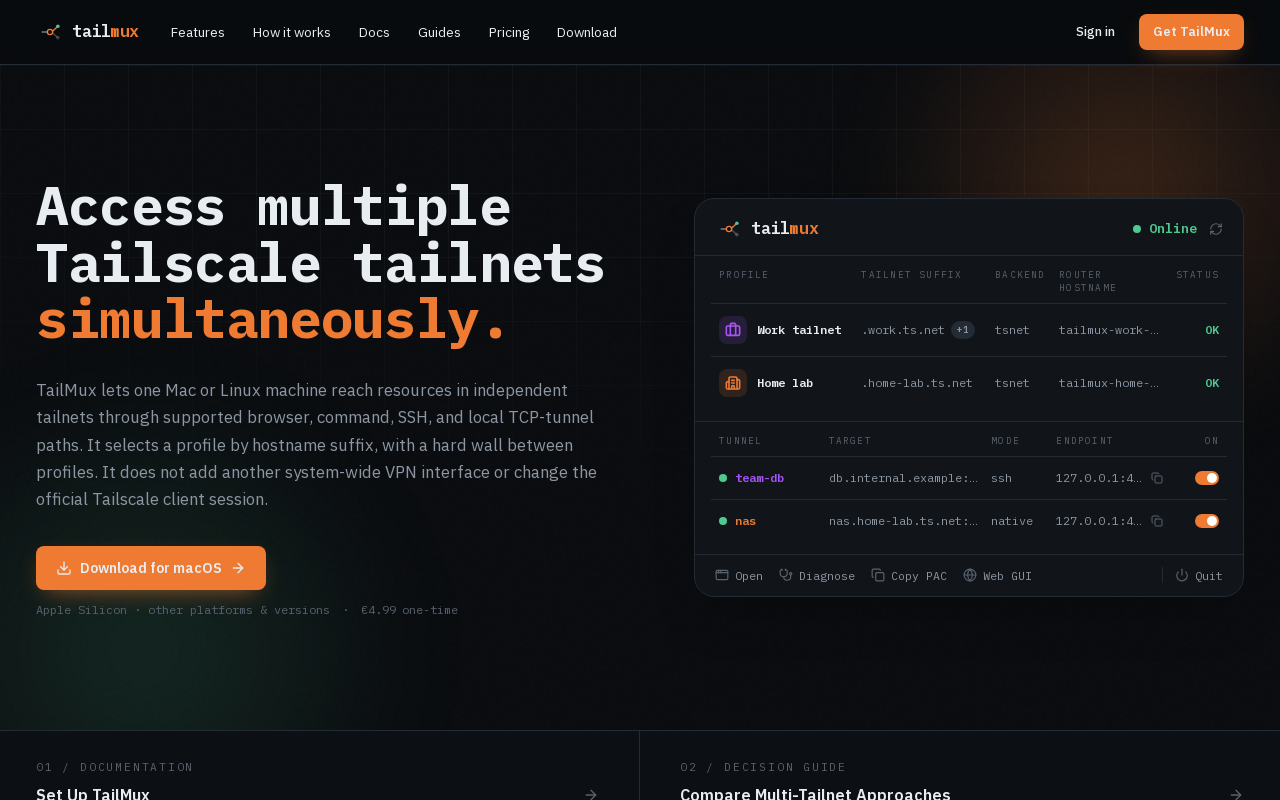
TailMux is a one-time purchase macOS and Linux tool that enables simultaneous access to resources in multiple independent Tailscale tailnets. It routes supported hostname-based connections per profile without account switching or altering the official Tailscale client session.
Key facts
What is TailMux?
Access multiple Tailscale tailnets simultaneously from one machine by routing connections based on hostname suffix with hard isolation between profiles.
Who is TailMux best for?
Developers, IT professionals, and power users who need to work across more than one Tailscale tailnet on a single Mac or Linux machine.
What are its main limitations?
- Only supports hostname-based connections (browser proxy, SSH, local TCP tunnels); cannot route arbitrary IP traffic system-wide
- Requires non-overlapping hostname suffixes – overlapping suffixes are rejected at config save, not runtime
- macOS only has full menu bar app; Linux is CLI-only (no GUI)
- Not affiliated with or endorsed by Tailscale Inc.; may lag behind official client updates
Limitations are based on product materials or editorial synthesis; confirm on the official site.
Key features
- ✓Suffix routing: hostname suffix determines which profile handles a request
- ✓Hard isolation: profiles never share state, sockets, node keys, or routes; traffic never bridges
- ✓Embedded tsnet: each profile runs its own Tailscale node with its own hostname, key, and state
- ✓Browser PAC: auto-generated PAC file sends only owned suffixes through TailMux; set as system proxy on macOS so Safari works
- ✓Service tunnels & SSH: pin a service (database, RDP, SMB) to a local port through one profile; SSH-bastion mode; tailmux ssh drops into a shell; tailmux run pushes curl, git, npm through the right profile
- ✓Honest diagnostics: tailmux diag path shows owner, visibility, latency per connection; diag fetch compares paths side by side
- ✓CLI first: all functionality scriptable from shell; menu bar and web GUI are thin wrappers
- ✓Linux headless support: full routing core (proxy env, tunnels, diagnostics) for servers and dev boxes; amd64 and arm64
Use cases
- →Access a work tailnet (work.ts.net) and a home-lab tailnet (home-lab.ts.net) concurrently from the same Mac without switching accounts
- →Tunnel a database (e.g., team-db.internal.example:5432) through one profile to a fixed local port for an IDE or CLI tool
- →SSH into hosts on different tailnets without manually changing the active Tailscale account
- →Route browser traffic for specific domains (like grafana.work.ts.net) through the correct tailnet while keeping other traffic direct
- →Run curl, git, or npm commands against resources in multiple tailnets from the same terminal session
- →Diagnose connectivity issues per tailnet with built-in netcheck and side-by-side path comparison
Pricing
TailMux License
€4.99 once
- · Perpetual license – yours forever
- · Full CLI: routing, PAC, tunnels, diagnostics
- · macOS menu bar app
- · Embedded tsnet multi-tailnet routing
- · macOS + Linux builds
- · Up to 5 devices per license
- · 1 year of updates included
One-time purchase of €4.99; includes 1 year of updates and a perpetual license for up to 5 devices. No subscription.
Pros
- +One-time purchase (€4.99) with perpetual license – no subscription required
- +Hard isolation between profiles prevents accidental cross-tailnet traffic
- +Simple hostname-based routing rule makes behavior predictable
- +Works without modifying the official Tailscale client session or adding another system VPN interface
- +Up to 5 devices per license; deactivation available to free slots
- +Open documentation and honest diagnostics help troubleshoot routing
Cons
- −Only supports hostname-based connections (browser proxy, SSH, local TCP tunnels); cannot route arbitrary IP traffic system-wide
- −Requires non-overlapping hostname suffixes – overlapping suffixes are rejected at config save, not runtime
- −macOS only has full menu bar app; Linux is CLI-only (no GUI)
- −Not affiliated with or endorsed by Tailscale Inc.; may lag behind official client updates
- −Limited to macOS and Linux; no Windows or mobile support
- −Failures are denied, not silently retried – can break workflows if misconfigured
Positioning
- Core value: Access multiple Tailscale tailnets simultaneously from one machine by routing connections based on hostname suffix with hard isolation between profiles.
- Ideal for: Developers, IT professionals, and power users who need to work across more than one Tailscale tailnet on a single Mac or Linux machine.
- Product type: Desktop application (CLI and macOS menu bar app); statically linked Go binary
Frequently asked questions
Can you connect to two Tailscale networks at the same time?
Yes. TailMux routes supported hostname-based connections to independent profiles per tailnet, allowing simultaneous access on macOS and Linux.
Can you be logged into two Tailscale accounts on one machine?
TailMux uses separate embedded profiles per tailnet, not the official Tailscale client session. Supported connections can use more than one configured profile without switching accounts.
What is the difference between fast user switching and simultaneous tailnets?
Fast user switching changes the active account or tailnet. TailMux keeps profiles available and selects per hostname connection, avoiding account switches for every destination.
How do I use a work and personal tailnet on the same Mac?
Define a TailMux profile per tailnet with non-overlapping hostname suffixes. Supported traffic for each suffix goes to its owning profile; names never fall back to another profile.
Is this a subscription?
No. It is a one-time purchase with a perpetual license. You are charged once only.
What happens after the first year?
You keep every version released during your year of updates forever. To receive updates published after that you can renew for another year, but you are never forced to.
Do I need a VM (OrbStack or Lima) to use two tailnets on macOS?
No, not when the workload fits TailMux's documented browser, command, SSH, or local TCP-tunnel paths. A VM remains appropriate for a separate full operating environment or native system-level networking.
You may also like
Curated suggestions based on similar categories.
Prompt Like A Pro
Improve your prompts for any goal, built on Anthropic, OpenAI, and Google's practices.
Craftly
Craftly turns rough notes and phone photos into listings, posts, and buyer replies that sound like you — just on your best day.
StudyEdge AI
StudyEdge AI is an AI study coach that automatically builds your weekly schedule, plans every session minute-by-minute, and runs study sessions with flashcards, quizzes, and active recall. One app for the entire semester.
Keymap
Keymap shows every menu shortcut in the app you're using. Double-press ⌘ to summon the panel. Spot conflicts. Remap keys. All local, all private.
Unified API+MCP Platform
Real-time unified API and MCP platform providing on-demand access to 759 data sources across 33 categories for B2B SaaS and AI agents.
Finamie
Finamie is a voice-first personal finance app for iOS that automatically logs transactions and generates personalized financial insights from spoken descriptions. Available in English and Spanish, it offers a free tier and a Premium subscription.