
Mojave Paint
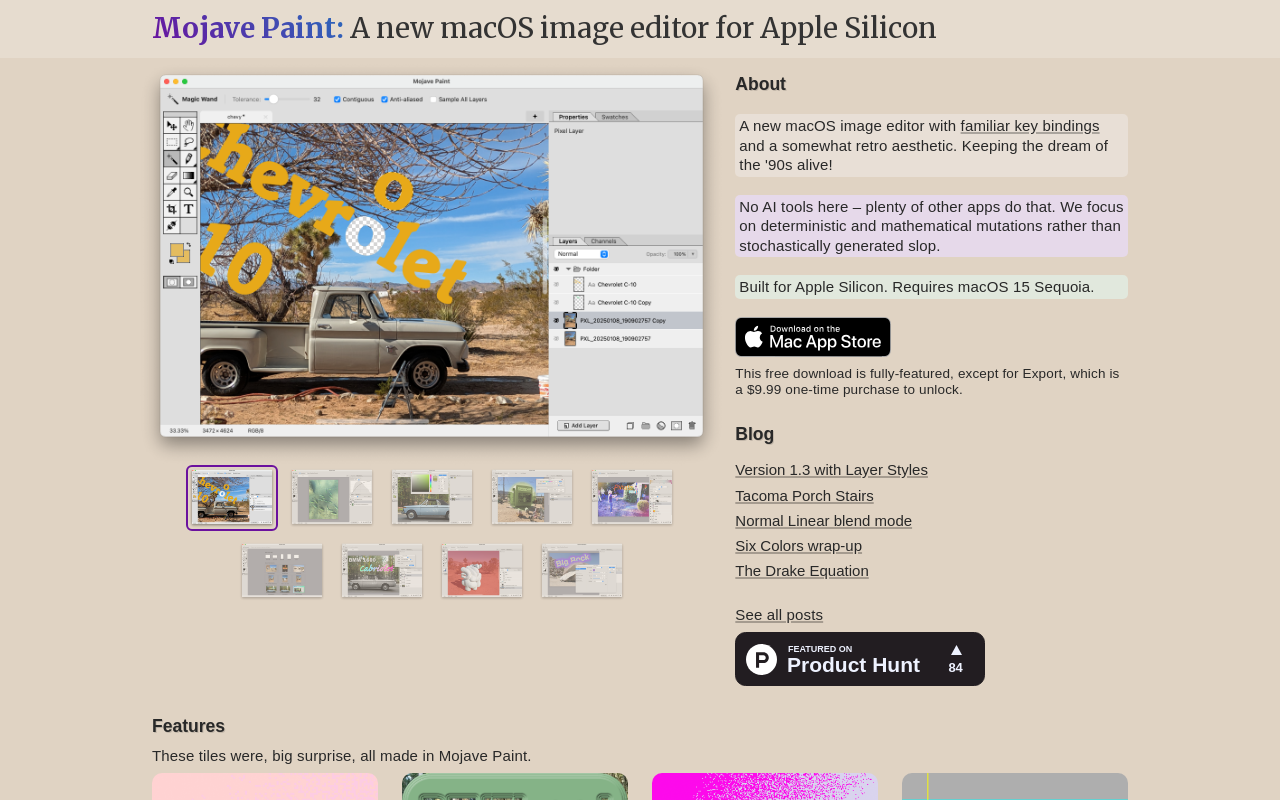
Mojave Paint is a native macOS image editor for Apple Silicon, requiring macOS 15 Sequoia. It offers a retro aesthetic and familiar key bindings, focusing on deterministic and mathematical mutations rather than AI-generated content. The app is free to download and fully-featured except for export, which is a $9.99 one-time purchase.
Key facts
What is Mojave Paint?
A deterministic, retro-inspired image editor for macOS that eschews AI in favor of precise control and mathematical mutations.
Who is Mojave Paint best for?
Mac users, designers, illustrators, and hobbyists on Apple Silicon with macOS 15 Sequoia.
What are its main limitations?
- Export requires a $9.99 one-time purchase
- Only supports macOS 15 Sequoia and Apple Silicon (no Intel support)
- Missing some advanced features like shape layers, smart objects, and warp tool (on roadmap)
- No AI features or generative tools (may be a con for users seeking AI assistance)
Limitations are based on product materials or editorial synthesis; confirm on the official site.
Key features
- ✓Layers with blend modes and layer masks
- ✓Selections, channels, and quickmask
- ✓Paintbrush, pencil, and gradient tools
- ✓Text tool and adjustment layers
- ✓Free transform, filters, and adjustments
- ✓Multiple documents in tabs with spring-loaded tabs
- ✓Layer styles (9 effects including drop shadow, bevel & emboss, etc.)
- ✓Exporting (paid unlock) and connection to external services
Use cases
- →Photo retouching and color correction
- →Digital painting and illustration
- →Graphic design composition and layout
- →Image editing for web or print
- →Creating and applying layer styles for text and shapes
- →Restoring or manipulating images with deterministic filters
Pricing
Free
$0
- · All features except export
Export Unlock
$9.99 one-time
- · Unlocks export functionality
Free download fully-featured except export; $9.99 one-time purchase to unlock export.
Pros
- +No AI generation, deterministic and mathematical editing
- +Free download is fully-featured except for export
- +Native Apple Silicon performance and optimization
- +Retro aesthetic with familiar key bindings for power users
Cons
- −Export requires a $9.99 one-time purchase
- −Only supports macOS 15 Sequoia and Apple Silicon (no Intel support)
- −Missing some advanced features like shape layers, smart objects, and warp tool (on roadmap)
- −No AI features or generative tools (may be a con for users seeking AI assistance)
Positioning
- Core value: A deterministic, retro-inspired image editor for macOS that eschews AI in favor of precise control and mathematical mutations.
- Ideal for: Mac users, designers, illustrators, and hobbyists on Apple Silicon with macOS 15 Sequoia.
- Product type: macOS native app
Frequently asked questions
What is Mojave Paint?
Mojave Paint is a native macOS image editor for Apple Silicon with a retro aesthetic and familiar key bindings. It focuses on deterministic, mathematical mutations rather than AI-generated content.
How much does Mojave Paint cost?
The app is free to download and fully-featured except for export. Export is a $9.99 one-time purchase to unlock.
Does Mojave Paint require macOS 15?
Yes, Mojave Paint requires macOS 15 Sequoia and is built exclusively for Apple Silicon (M-series chips).
Does Mojave Paint use AI or generative tools?
No. Mojave Paint explicitly does not include AI tools. It emphasizes deterministic and mathematical mutations.
What are the key features of the latest release (1.3.0)?
Version 1.3.0 introduced Layer Styles with 9 effects (Color Overlay, Gradient Overlay, Satin, Inner Shadow, Inner Glow, Drop Shadow, Outer Glow, Stroke, Bevel & Emboss) and a Crystallize filter.
Can I use Mojave Paint on an Intel Mac?
No, Mojave Paint requires an Apple Silicon (M1 or later) Mac and macOS 15 Sequoia.
You may also like
Curated suggestions based on similar categories.
ProductShot AI
ProductShot AI is a browser-based AI product photography workspace for ecommerce sellers, marketers, and small teams. It turns a single uploaded product image into white-background photos, studio shots, lifestyle scenes, marketplace listing images, and campaign creative.
PhotoToVideoAI
PhotoToVideoAI helps creators, marketers, designers, and small businesses turn still photos and images into short AI videos with motion, camera movement, and creative prompts.
With You
With You is a cloud storage-based instant messaging app that allows users to share images, videos, movies, and life moments. It features a private screening room for group watching synchronized videos and shared family albums with photo/video comments and likes.
Face Swag
AI-powered online tool for transforming photos and videos with face swapping technology.
Removal.AI
AI-powered background removal tool that instantly removes backgrounds from images, offers editing tools, API integration, and credit-based pricing for high-resolution downloads.
Pixfy AI
Pixfy AI is an all-in-one AI image editor that lets you edit photos by describing changes in natural language. It offers a suite of AI tools including image generation, object removal, background removal, image enhancement, clothes changing, and more, all accessible through a simple web interface.