
superfile
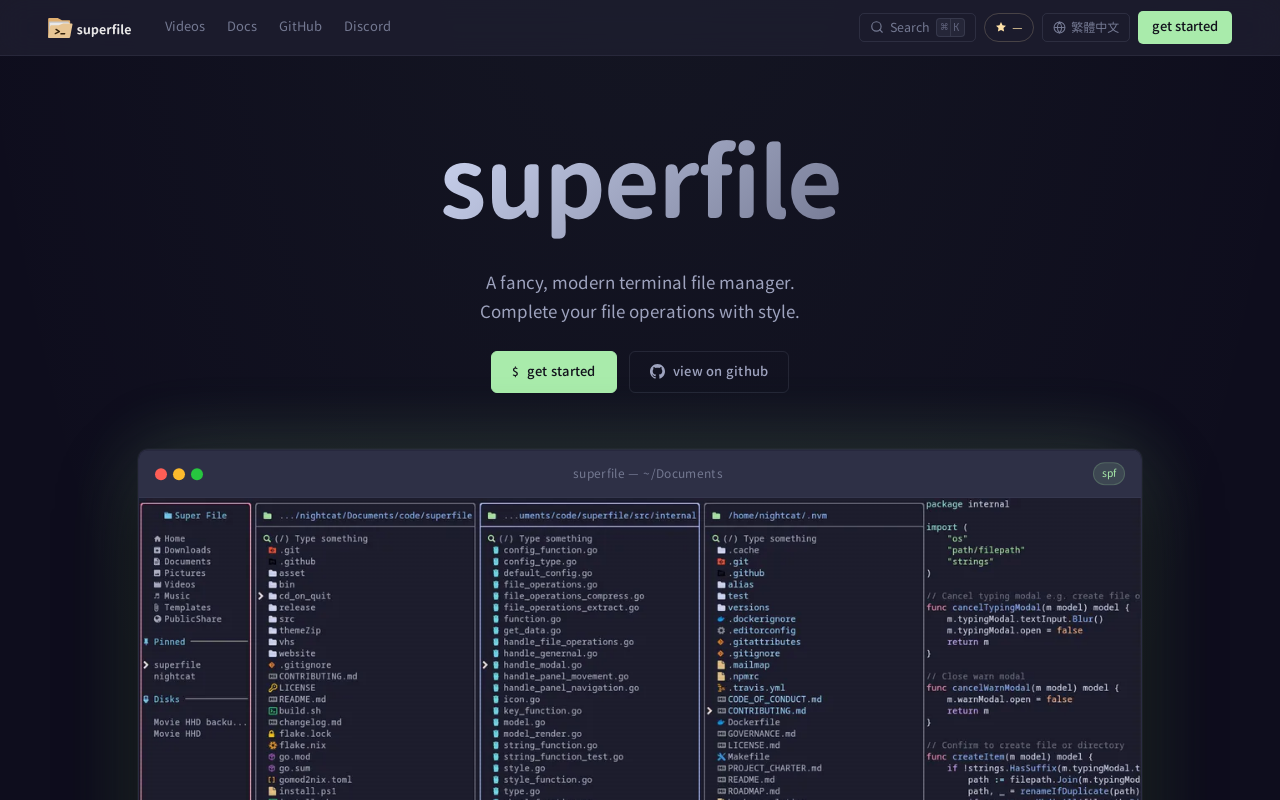
Superfile is an open-source terminal file manager built with Go and Bubble Tea, offering a polished UI and complete file operations for developers who work in the terminal.
Key facts
What is superfile?
A fancy, modern terminal file manager that combines obsessively refined UI with the raw speed and power of terminal tools.
Who is superfile best for?
Developers, terminal users
Does superfile have a free plan?
According to official sources, a free plan is available.
What are its main limitations?
- Terminal-only – no GUI for users not comfortable with command line
- May require learning custom hotkeys for efficient use
- Plugin ecosystem is community-driven and may have limited options
Limitations are based on product materials or editorial synthesis; confirm on the official site.
When was this information verified?
July 27, 2026
Sources
- Official homepageofficial homepage · Jul 27, 2026
Key features
- ✓Beautiful UI with pixel-perfect rendering
- ✓Complete file operations: copy, move, delete, rename, fuzzy search, bulk operations, image preview
- ✓Fully customizable: remap hotkeys, choose themes, adjust borders and colors
- ✓Multiple panels: split into simultaneous directory panes with cross-panel copy/paste
- ✓Plugin support: Git status integration, system monitoring, custom commands
- ✓20+ built-in themes: Catppuccin, Nord, Tokyo Night, Dracula, Gruvbox, Rose Pine
- ✓Cross-platform: macOS, Linux, Windows (via Homebrew, Arch Linux, Nix, or direct install script)
Use cases
- →Navigate and manage files in the terminal with a modern UI
- →Perform bulk file operations (copy, move, rename) across multiple panels
- →Quick fuzzy search to locate files in large directories
- →Integrate Git status or system monitoring via plugins
- →Customize keybindings and appearance to match individual workflows
Pricing
Free (Open Source)
$0
- · All features including plugins and themes
- · MIT licensed
Superfile is completely free and open source under the MIT License.
Pros
- +Open source under MIT license – free to use and modify
- +Obsessively refined UI that rivals desktop file managers
- +Fast and lightweight (built with Go and Bubble Tea)
- +Fully customizable appearance and keybindings
- +Plugin ecosystem for extending functionality
Cons
- −Terminal-only – no GUI for users not comfortable with command line
- −May require learning custom hotkeys for efficient use
- −Plugin ecosystem is community-driven and may have limited options
Positioning
- Core value: A fancy, modern terminal file manager that combines obsessively refined UI with the raw speed and power of terminal tools.
- Ideal for: Developers, terminal users
- Product type: Terminal application (CLI)
Frequently asked questions
What is superfile?
Superfile is a modern, fancy terminal file manager built with Go and Bubble Tea. It provides a pixel-perfect UI and complete file operations for developers.
How do I install superfile?
You can install via Homebrew on macOS/Linux, download from Arch Linux AUR, use Nix, or run the install script directly. See the install guide on the website.
Is superfile free?
Yes, superfile is open source under the MIT License and completely free to use.
Which operating systems are supported?
Superfile supports macOS, Linux, and Windows.
Can I customize superfile?
Yes, superfile is fully customizable. You can remap every hotkey, choose any theme, and adjust every border and color.
Does superfile support plugins?
Yes, superfile has plugin support. Community plugins include Git status integration, system monitoring, and custom commands.
You may also like
Curated suggestions based on similar categories.
PDF Translate
PDF Translate is a browser-based AI tool that translates PDFs while preserving layout, fonts, tables, and images. It supports over 60 languages and multiple translation engines, including Google Translate, Bing Translate, OpenAI, and DeepL. Users can upload PDFs up to 200MB, choose source and target languages, and download single-language or bilingual PDFs in seconds.
Notate
Notate is a browser extension that lets you highlight text, videos, and PDFs, then instantly syncs everything to your Notion or Obsidian workspace. It includes AI-powered chat, page chat, screenshots, and email reminders to help capture and organize information without disrupting your workflow.
Agentarius
Agentarius is a web-based AI tools guide that lists 129 tools, offering side-by-side comparisons, pre-built tool stacks, and written verdicts to help users select the right AI tool for their job or task.
DriftNote
DriftNote is an AI‑powered toolkit for both podcast listeners and creators. Listeners get instant structured summaries from any episode via Spotify, Apple, YouTube, or RSS links, and can follow podcasts to auto‑summarize new episodes. Creators upload raw audio (MP3, MP4, M4A, WAV) and receive production‑ready show notes, titles, chapters, full transcripts, and key quotes tuned to their podcast’s style.
Tripzy
Tripzy is a live travel companion that turns TikTok, Reel, and YouTube videos into fully planned trips by extracting locations, building itineraries, and syncing activities on a shared calendar.
JobHawk
JobHawk is a job search tracking tool with AI-powered interview preparation. It provides AI-generated company briefs, predicted questions, and an Application Health Score to help job seekers stay organized and prepared.